반응형
Flutter에서 Safe Area란?
A widget that insets its child with sufficient padding to avoid intrusions by the operating system.
OS 침입을 피하기 위해 자식 위젯에 충분한 패딩을 삽입하는 위젯.
모바일 디바이스 상단(상태바)과 하단(홈 버튼 등)에 OS 영역이 존재한다.
그런 영역 침범을 피해서 개발을 해야하기 때문에 Safe Area를 사용해야 한다.
기본 사용법
간단하게 사용할 위젯을 감싸주면 됩니다.
SafeArea(
  child: Container(
    constraints: const BoxConstraints.expand(),
    alignment: Alignment.center,
    color: Colors.blue,
    child: const Text('Hello, World!'),
  ),
)
Scaffold를 사용한다면 body에 선언해주면 됩니다.
  @override
  Widget build(BuildContext context) {
    return Scaffold(
      body: SafeArea(
        child: Container(
          decoration: BoxDecoration(color: Colors.yellowAccent),
          child: Text("Hello World!!!"),
        ),
      ),
    );
  }
이렇게 하면 일반적으로 사용이 가능하지만, 만약 bottomNavigationBar를 사용하고 있다면
body와 bottomNavigationBar를 모두 SafeArea로 감싸주어야 합니다.
  @override
  Widget build(BuildContext context) {
    return Scaffold(
      appBar: AppBar(title: Text("Title"), backgroundColor: Colors.white),
      bottomNavigationBar: SafeArea(
        child: SizedBox(
          height: 60,
          child: TabBar(
            indicatorColor: Colors.red,
            labelColor: Colors.black,
            controller: _tabController,
            tabs: <Widget>[
              Tab(icon: Icon(Icons.home_rounded), text: "홈"),
              Tab(icon: Icon(Icons.schedule_rounded), text: "스케줄"),
            ],
          ),
        ),
      ),
      body: SafeArea(
        child: Container(
          decoration: BoxDecoration(color: Colors.yellowAccent),
          child: Text("Hello World!!!"),
        ),
      ),
    );
  }
body만 SafeArea로 감싸면, OS의 상단 영역과 하단 영역을 그대로 침범하기 때문에
bottomNavigationBar를 꼭 감싸주어야 합니다!
Properties
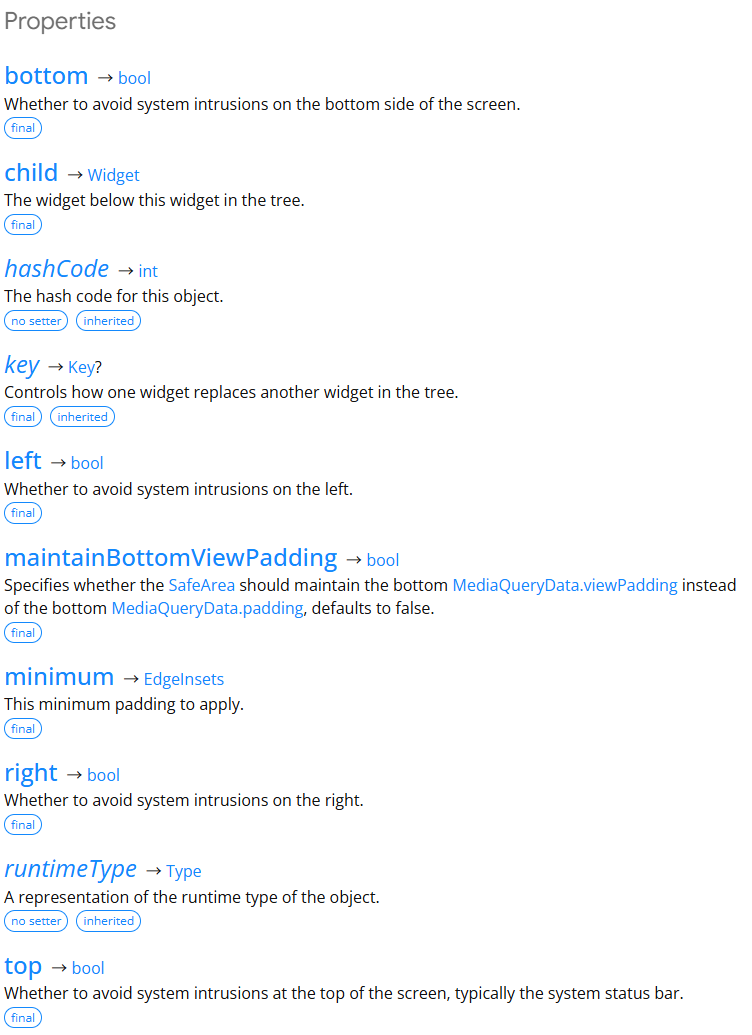
주요 프로퍼티는 bottom, left, right, top: 각 영역에서 시스템 침입을 방지할지 여부,
maintainBottomViewPadding: Safe Area가 MediaQueryData.padding 대신 하단 MediaQueryData.viewPadding을 유지해야하는지 여부,
minimum: 적용할 최소 패딩
등이 있습니다.
참고: https://api.flutter.dev/flutter/widgets/SafeArea-class.html
반응형
'IT > Flutter' 카테고리의 다른 글
| [Flutter] 하단 탭바 만들기 (BottomNavigationBar, SingleTickerProviderStateMixin) (0) | 2025.10.10 |
|---|